



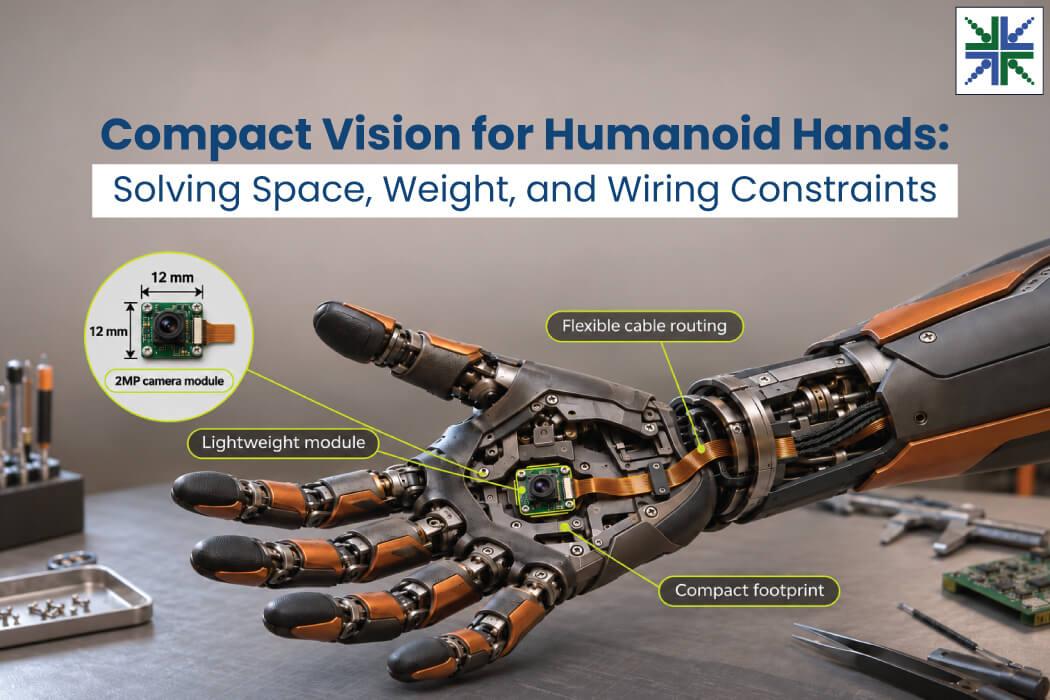
A humanoid can see a cup on a table, reach for it, but still fail to pick it up. How does this happen? Well, as the hand gets close, the fingers obscure the view of the cup for the head-mounted camera. The robot loses sight of the cup at the exact point it needs to be able to grasp it, and a wrist angle off by a few degrees is quite sufficient to miss.
Cluttered workspaces are even worse. If the hand has to go behind other items or into a narrow shelf recess, the grasp point can be lost before the fingers have even fully closed.
Palm and wrist cameras help address this by bringing the viewpoint closer to the grasp. A compact RGB sensor mounted near the end effector sees the object from the robot’s working angle. The perception software uses those images to refine the grasp, follow the item while it’s handled, and check its position before release.
In this blog, you’ll find out about the various vision problems that humanoids go through and the solutions that help to get around them.
Palm and Wrist-Based Vision Challenges Faced by Humanoids
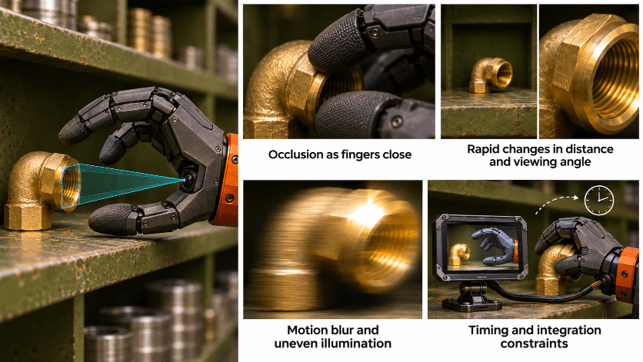
Occlusion during grasping
Even with palm- and wrist-mounted cameras, fingers and grasped objects can still obstruct the view. As the hand closes, critical details such as object edges and contact points may become hidden. The extent of occlusion also depends on the grasp type, camera position, and viewing angle.
Rapid changes in distance and viewing angle
The camera travels with the hand while the target approaches the lens. Its apparent size increases quickly, and a slight wrist rotation can push the grasp area toward the edge of the frame. Very short operating distances also put pressure on lens focus and depth of field. Small features can become difficult to distinguish.
Motion blur and uneven illumination
Wrist rotation and finger activity create fast changes within the image. Longer exposure times can smear object boundaries during a reach. Fingers cast shadows over the target, while glossy packaging and metallic tools produce highlights that obscure texture. The camera must capture recognizable details despite changing light and relative motion.
Timing and integration constraints
A frame can be visually sharp yet arrive too late for a correction. Camera capture, image transfer, inference, and controller updates add delay. Joint positions recorded at a different instant may distort image-to-pose mapping. Meanwhile, the sensor and its connections occupy space within an articulated assembly that must withstand repeated wrist rotation.
How to Improve Palm and Wrist Camera Performance in Humanoid Robots
Select a viewpoint around the grasp sequence
Start with the intended task rather than the PCB location. Product teams can model the fingers, object, and lens view in CAD, then test candidate positions through approach, contact, lift, and release. Palm-facing optics work well for details near the fingertips; a wrist viewpoint can cover a wider manipulation area. Lens field of view and close-focus range should be evaluated together.
Feed RGB observations into grasp control
Visual tracking can follow object corners, edges, or other identifiable features as the hand interacts with the target. Software can compare the observed pose with the planned grasp and request small corrections to wrist orientation or gripper position. After contact, image feedback can indicate rotation or displacement. Tactile sensors remain useful for contact and force information that RGB images alone cannot measure.
Configure imaging for fast hand activity
Global-shutter sensors capture a frame at a common instant, reducing geometric distortion associated with rolling-shutter readout. Shorter exposures can limit blur, provided illumination is sufficient. Exposure and gain control should be tested against shadows and reflective materials. Frame rate is important, but the usable feedback rate also depends on image-processing time and the host controller’s update cycle.
Calibrate camera data against the robot pose
Hand-eye calibration relates camera coordinates to the wrist and gripper reference frames. Where multiple cameras are installed, synchronized capture or dependable timestamps can help associate observations with joint encoder readings. Product developers should measure end-to-end latency through the complete perception loop, and then check calibration again after mechanical assembly and repeated joint cycling.
Compact Camera Solutions from e-con Systems for Humanoids
e-con Systems has been designing, developing, and manufacturing embedded vision solutions, from custom OEM cameras to complete ODM platforms, since 2003. We offer custom cameras for humanoid palm and wrist vision. They come with features like global shutter, GMSL2 interface, Full HD video capture, external triggering for multi-camera setups, and optional LED strobe synchronization.
We also provide camera customization involving optics, board layout, and interface choices.
Explore our humanoid vision solutions.
Use our Camera Selector to explore our complete portfolio.
If you are looking to discuss details like palm dimensions, working distance, multi-camera timing, and cable requirements, please write to camerasolutions@e-consystems.com.
FAQs
- Should a humanoid use a palm camera, a wrist camera, or both?
The choice depends on the grasp types and the area the controller needs to observe. A palm-mounted viewpoint can reveal details close to the fingertips, while a wrist-mounted unit can monitor a broader region around the gripper. Using both may improve coverage, although it adds calibration and data-handling demands.
- How can product teams assess close-focus performance before integration?
Place test objects at the expected working distances and capture images throughout a complete grasp cycle. Check edge detail, focus, distortion, and usable field of view as the fingers change position. A nominal sensor resolution alone says little about image quality at the actual point of contact.
- Can RGB vision detect an object slipping within the hand?
Tracking visible edges or texture can reveal a change in an object’s orientation or position relative to the gripper. Such observations depend on an unobstructed view and enough image detail. Grip-force sensing can complement camera feedback when the contact area is hidden.
- How do product teams connect camera observations with finger-joint positions?
They establish a calibrated transformation between the camera and robot reference frames, then associate images with time-aligned encoder readings. Hardware triggering or timestamp alignment may be appropriate depending on the architecture. Testing should measure capture-to-control delay rather than relying only on the advertised sensor frame rate.
- Is higher resolution always better for palm and wrist vision?
Higher pixel counts can reveal smaller object features, but they can increase bandwidth and processing demands. Lens quality, exposure, working distance, and total latency can be just as crucial. The best camera choice follows the size of the visual features the robot must identify and the available compute budget.

Dilip Kumar is a computer vision solutions architect having more than 8 years of experience in camera solutions development & edge computing. He has spearheaded research & development of computer vision & AI products for the currently nascent edge AI industry. He has been at the forefront of building multiple vision based products using embedded SoCs for industrial use cases such as Autonomous Mobile Robots, AI based video analytics systems, Drone based inspection & surveillance systems.