



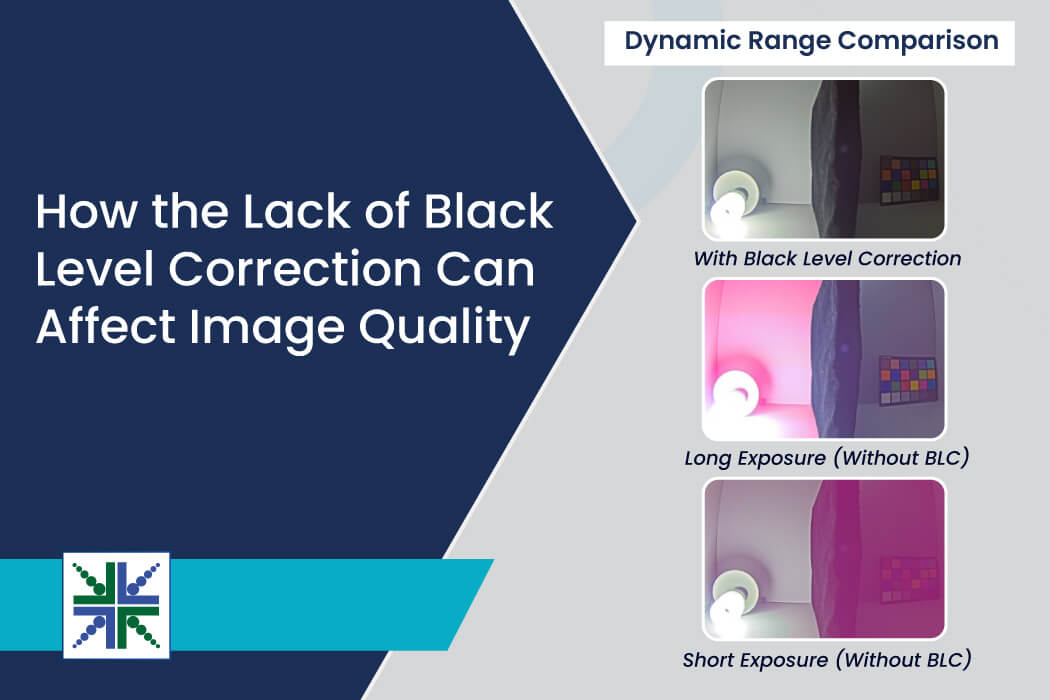
The first blog in this series covered what Black Level Correction (BLC) is, the physics behind dark current and the black level offset, how that offset is measured, why sensors add a deliberate pedestal before the ADC, and how BLC interacts with each stage of the ISP pipeline from lens shading correction through HDR processing.
To quickly summarize, image sensors produce a non-zero signal in complete darkness and removing that offset at the very start of the ISP pipeline is what gives every downstream stage clean, accurate data to work with.
The black level is the reference point for true black in a camera system. When this reference is incorrect, it doesn’t affect just one part of the image. It influences almost every image quality parameter in the ISP pipeline.
In part two of this blog series, you’ll discover the nine parameters, examining what goes wrong in each case and what the output looks like when correction is done properly.
9 Image Quality Parameters Affected by Black Level
1) Brightness
Brightness depends on how pixel values are mapped from the sensor. When the black level is too high, the system assumes the sensor already has light, even in the dark. After subtraction, pixels become artificially elevated, causing the entire image to look brighter than it should and producing a washed-out appearance. When the black level is too low, some real signals are removed incorrectly, making the image appear darker than expected and reducing visibility in shadow areas.
2) Contrast
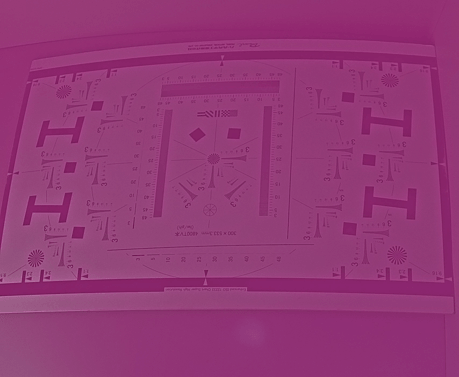
Contrast is the difference between dark and bright regions in the image. When the black level is incorrect, dark pixels aren’t anchored at zero, and shadows are lifted above true black. This reduces the gap between dark and bright areas, making the image look flat and less dynamic. Correct black level restores the proper black reference, which improves separation between shadows and highlights.
As shown in figure 1a, the center looks more smudged. There is no detail in the center part due to poor black level correction, whereas in figure 1b, the detail in the center is preserved due to good black level correction.
 |
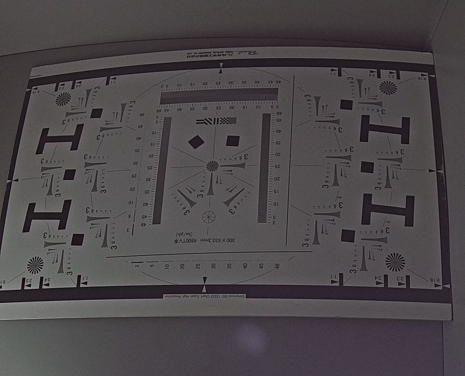 |
| Figure 1a: Contrast – Black Level Offset Not Corrected | Figure 1b: Contrast – Proper Black Level Correction |
3) Sharpness
Sharpness depends on edge transitions between pixels. If the black level is wrong, pixel values in dark regions are already at an incorrect level. This weakens edge differences, particularly in low-light areas where edges are subtle. As a result, fine details may look slightly blurred or less defined.
4) Color accuracy
Color is calculated using the relationships between R, G, and B pixel values. If the black level isn’t correct, all three channels start from a wrong baseline, introducing bias in RGB ratios, especially in dark or shadow regions. The result is a slight color cast inside shadows, which may appear tinted green, red, or blue instead of neutral.
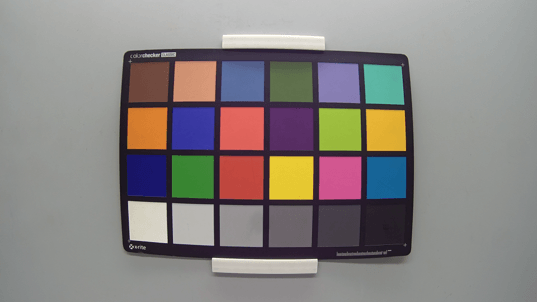
As shown in figure 2a, the black level is not corrected properly, resulting in distorted RGB values and a noticeable bluish tint in the final image. Figure 2b shows the result after proper black level correction. The correct RGB channel ratios are restored, producing more accurate and natural color reproduction.
 |
 |
| Figure 2a: Color Accuracy – Black Level Offset Not Corrected | Figure 2b: Color Accuracy – Proper Black Level Correction |
5) Noise level
Noise estimation depends on knowing what a zero signal looks like. When the black level is wrong, the system may treat a valid signal as noise, leading to over-smoothing, or may treat noise as a valid signal, leaving grain in the image. This produces either overly soft images or noisy dark regions, depending on the direction of the error.
6) Dynamic range
Dynamic range is the usable difference between the darkest and brightest details the camera can reproduce. If the black level is set incorrectly, the bottom of the signal range is displaced upward or clipped. This reduces the available range for shadows, meaning the camera loses detail in dark areas.
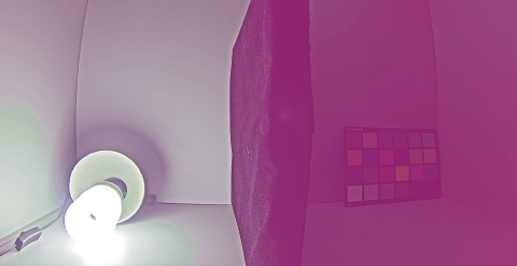
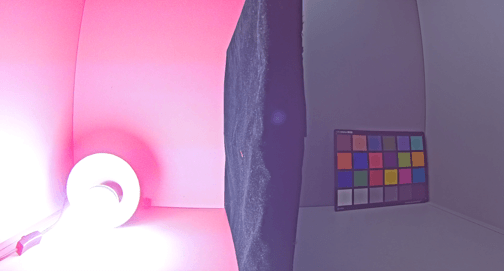
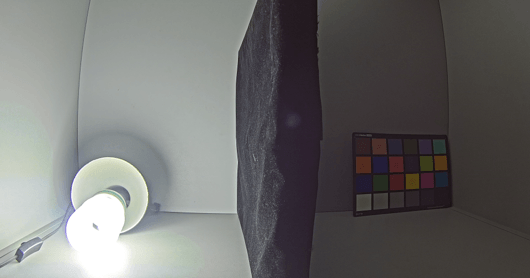
As seen in figure 3a, the black level offset is not corrected properly. In long exposure, the darker region shows pink tint and the details were lost in that region.
As shown in the figure 3b, in the case of short exposure, if the black level is not corrected properly, pink tint and blooming appear near the brightest region. And the details are lost in that region.
Figure 3c shows the result after proper black level correction. The details can be clearly seen in both dark and bright regions.
 |
 |
 |
| Figure 3a: Short Exposure – Black Level Offset Not Corrected | Figure 3b: Long Exposure – Black Level Offset Not Corrected | Figure 3c: Proper Black Level Correction |
7) Exposure
Exposure is controlled by sensor settings, but the black level affects how those settings are interpreted. If the black level is incorrect, the image may appear too bright or too dark even when exposure settings are correct. This can mislead auto-exposure algorithms, causing unstable brightness adjustments.
8) Low-light performance
Low-light scenes are the most sensitive to black level errors. In dark conditions, even small offsets become visible. Shadows may look gray instead of black, noise gets more noticeable, and the image takes on a hazy or foggy appearance. Correct black level ensures that only real light contributes to the image, making low-light output cleaner and more natural. Without it, the image looks foggier and more noise is visible throughout the dark regions.
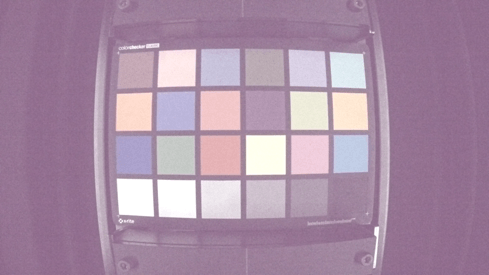
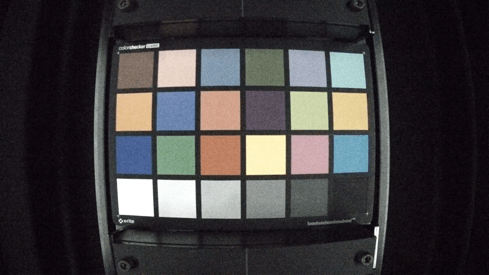
As shown in Figure 4a, the black level is not corrected properly, causing the image to appear hazy with increased visible noise in the darker regions.
Figure 4b shows the result after proper black level correction. The image appears cleaner, with reduced noise and improved shadow reproduction, resulting in more natural low-light performance.
 |
 |
| Figure 4a: Low-Light Performance – Black Level Offset Not Corrected | Figure 4b: Low-Light Performance – Proper Black Level Correction |
9) Color cast
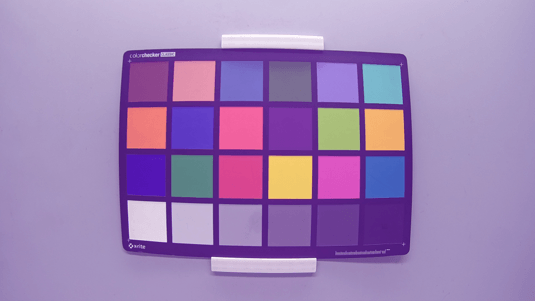
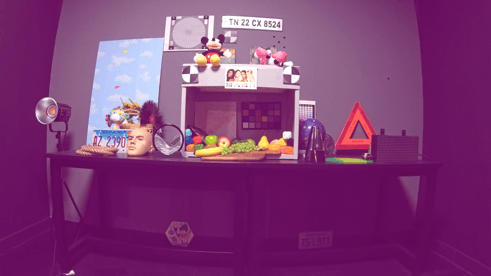
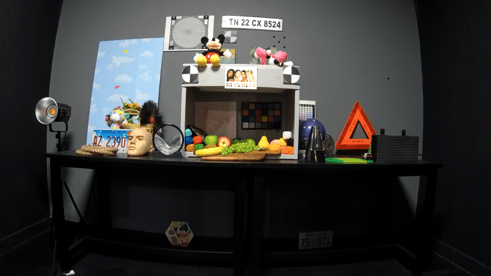
A violet tint may appear in dark or near-overexposed areas when Black Level Correction doesn’t completely remove the sensor’s black-level signal. The remaining offset is amplified by white balance gains, especially in the red and blue channels, causing a purple color cast and loss of color detail. Precise black level correction removes this residual offset before it is amplified downstream, preserving natural colors and preventing violet tint artifacts.
Figure 5a shows the effect of improper black level correction, where a noticeable purple color cast appears, resulting in inaccurate colors and loss of color detail. As shown in Figure 5b, proper black level correction preserves natural colors by removing the residual black-level offset, preventing violet tint artifacts.
 |
 |
| Figure 5a: Black Level Offset Not Corrected | Figure 5b: Proper Black Level Correction |
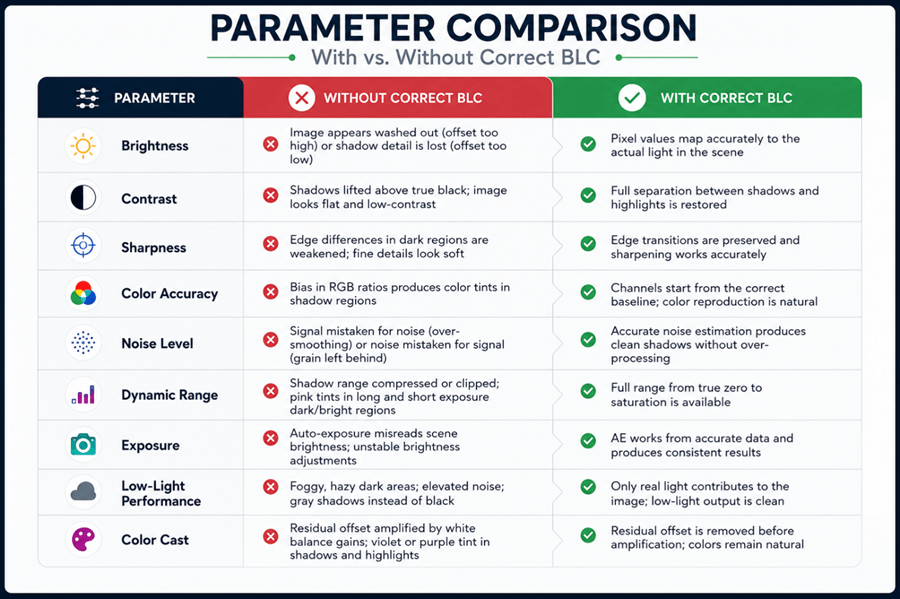
Parameter Comparison: With vs. Without Correct BLC
e-con Systems: Embedded Vision Pioneers Since 2003
Since 2003, e-con Systems® designs, develops, and manufactures embedded vision solutions from custom OEM cameras to complete ODM platforms. We also offer TintE™, an FPGA-based Image Signal Processor delivered as a turnkey ISP pipeline. Its configurable processing blocks include black level correction, debayering, automatic white balance, automatic exposure, gamma correction, and other critical tasks required for consistent imaging output.
Use our Camera Selector to view our end-to-end portfolio.
For help with camera selection, ISP development, or integration, please contact our experts at camerasolutions@e-consystems.com.
Frequently Asked Questions
Why does a black level error affect so many image quality parameters at once?
Black level sets the sensor’s zero light reference. All pixel-based parameters are affected if it’s wrong, since their calculations start with these values.
Which parameter is most visibly affected by black level errors?
Low-light performance tends to show the most obvious degradation because the genuine optical signal is small relative to the offset error. In bright light, the signal is large enough that a small offset has minimal proportional impact. In dark scenes, the offset is a much larger fraction of the total pixel value, making errors in contrast, color, and noise all more visible simultaneously.
Why does the color cast appear specifically as violet or purple?
White balance gains applied to the red and blue channels are typically larger than those applied to green. When a residual offset remains after BLC, those larger gains amplify the error in red and blue more than in green, pushing the resulting color toward purple or violet. The tint is most visible in shadows and near-overexposed areas where the imbalance between channels is most pronounced.
Can auto-exposure correct for a black level error on its own?
No. Auto-exposure adjusts settings by frame brightness. If the black level is wrong, these decisions are based on an inaccurate brightness map.
Does black level correction affect noise reduction quality?
Directly. Noise reduction algorithms estimate how much variation in a pixel value is noise versus genuine signal. That estimation requires knowing what the sensor looks like at zero signal. If the black level is off, the noise model is trained on incorrect data, causing the filter to either over-smooth valid detail or leave behind noise that should have been removed.

Prabu is the Chief Technology Officer and Head of Camera Products at e-con Systems, and comes with a rich experience of more than 15 years in the embedded vision space. He brings to the table a deep knowledge in USB cameras, embedded vision cameras, vision algorithms and FPGAs. He has built 50+ camera solutions spanning various domains such as medical, industrial, agriculture, retail, biometrics, and more. He also comes with expertise in device driver development and BSP development. Currently, Prabu’s focus is to build smart camera solutions that power new age AI based applications.